
Continuedev — https://github.com/continuedev/continue
После установки у вас должна появиться вкладка «Continue» на боковой панели.
Откройте ее. Вы должны увидеть значок настроек (похожий на шестеренку).
Как только вы нажмете на значок настроек, в редакторе должен открыться файл config.json.
{
  "models": [
    {
      "apiBase": "http://swe.sogaz.ru:11434/",
      "model": "qwen2.5-coder:14b",
      "provider": "ollama",
      "title": "qwen2.5-coder:14b"
    }
  ],
  "tabAutocompleteModel":
    {
      "apiBase": "http://swe.sogaz.ru:11434/",
      "model": "qwen2.5-coder:14b",
      "provider": "ollama",
      "title": "qwen2.5-coder:14b"
  }
}
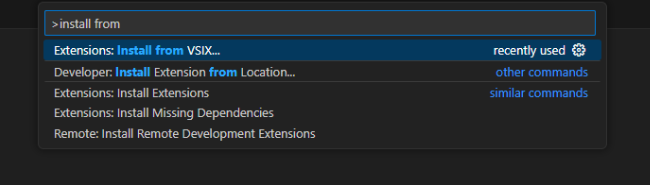
VsCode Installation
F1 + Install from VSIX
JetBrains Installation
Download the plugin archive (ZIP or JAR).
Press Ctrl Alt S to open settings and then select Plugins.
On the Plugins page, click  and then click Install Plugin from Disk.

Select the plugin archive file and click OK.
Click OK to apply the changes and restart the IDE if prompted.
